If you've ever started a coding project, you've probably asked yourself: "Should I use a library or a framework?" They both promise to save you time, provide reusable code, and make development smoother. But the difference between them is bigger than most beginners realize. Choosing the wrong one can turn a simple project into a confusing mess.
In this post, we'll break down the distinction, give real-world analogies, show examples in modern web development, and even provide code snippets so it clicks immediately.
Library vs Framework in One Sentence
Here's the cheat code:
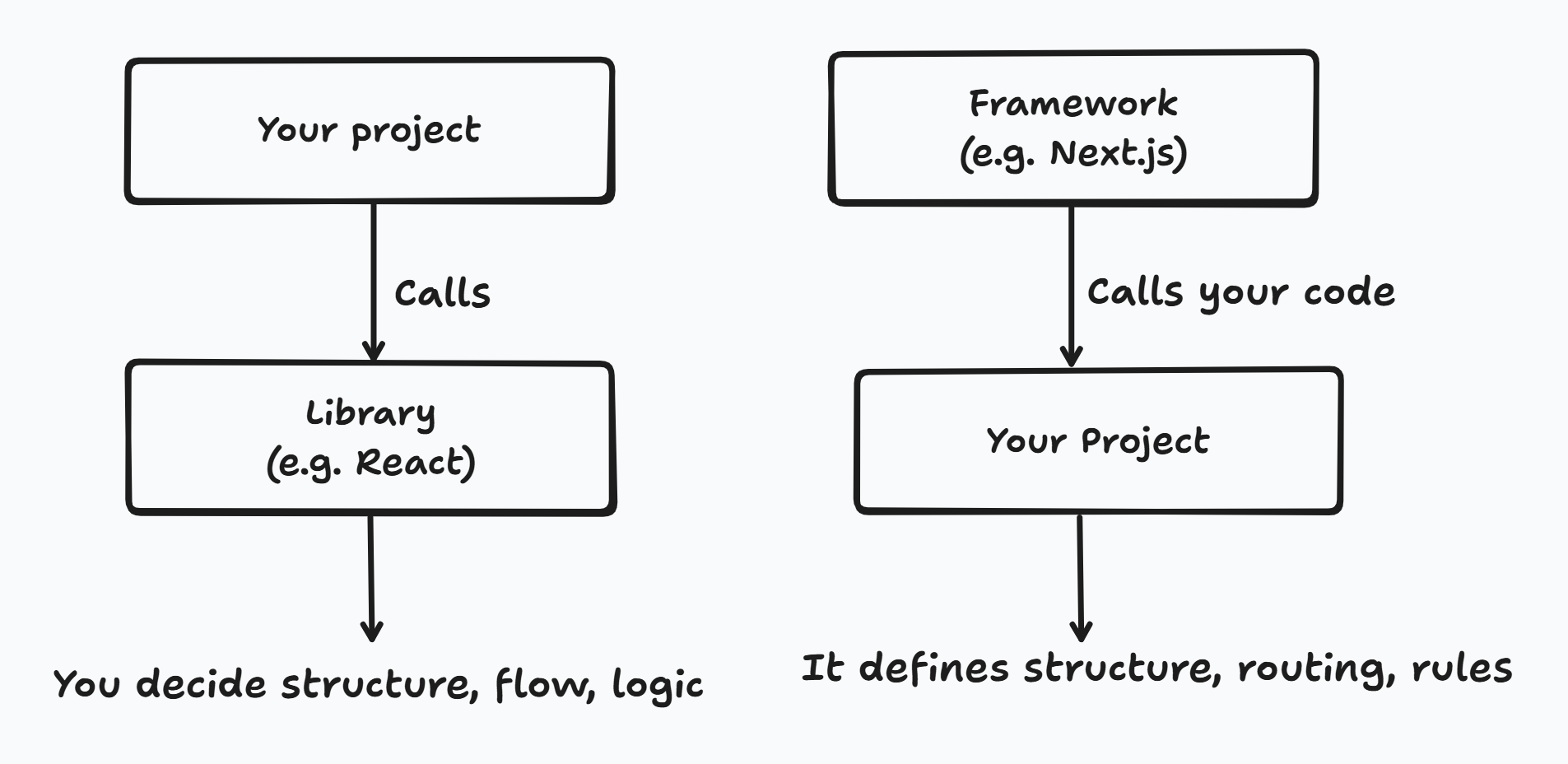
- Library: You're in charge. You call the code when you need it.
- Framework: It's in charge. It calls your code at specific points.
This concept is also called "Inversion of Control". Basically, with a framework, you follow its rules. With a library, you make the rules.
A Side-by-Side Comparison
| Aspect | Library | Framework |
|---|---|---|
| Control Flow | You call it | It calls you |
| Ownership | You structure the app | Framework dictates the structure |
| Flexibility | High | Medium/Low |
| Examples | React, NumPy, Lodash | Angular, Django, Next.js |
| Analogy | Toolbox | Skeleton or meal kit |
Real-World Analogy: Cooking
Imagine you're cooking dinner:
- A library is like a box of ingredients. You can make any dish in any order. You control everything.
- A framework is like a meal kit. It comes with a recipe and a plan. You can add spices or tweak a little, but you're generally following its instructions.
This is exactly why beginners sometimes feel "restricted" with frameworks, they aren't meant to give total freedom. They give structure so you don't have to reinvent the wheel every time.
Why This Matters in Web Development
React: The Library
React is a library for building UI components. It provides tools to create reusable UI elements like buttons, modals, and navigation bars. But beyond that, you decide:
- How the app is structured
- How routing works
- How data fetching works
Here's a tiny React example:
import React from "react";

function Greeting({ name }) {
  return <h1>Hello, {name}!</h1>;
}

export default Greeting;
You call this component wherever you want. React doesn't dictate when or how you use it.
Next.js: The Framework
Next.js is a framework built on React. It handles routing, server-side rendering, static site generation, and more. It dictates certain patterns, like:
- File-based routing (pages/index.js becomes your homepage)
- API routes (pages/api/)
- Built-in optimizations (SSR, SSG, image optimization)
A tiny Next.js page example:
// pages/index.js
export default function Home() {
  return <h1>Welcome to my Next.js site!</h1>;
}
Notice how you don't need to configure routing, Next.js handles it automatically. That's the framework "calling your code," instead of you calling the library manually.
Picking Between a Library and a Framework
- Project Complexity: Small or highly customized projects → library (React, Lodash); Larger projects with standard patterns → framework (Next.js, Angular, Django)
- Learning Curve: Libraries are easier to start with since they're more flexible; Frameworks have more conventions and rules but save time once you understand them.
- Community & Ecosystem: Both have huge communities, but frameworks often come with built-in tooling; Libraries might require piecing together multiple tools.
How I've Picked in My Own Projects
AI Explains Repo is built on Next.js. Routing, server-side data fetching and the build pipeline came with the framework, and my job was to fill in the slots it handed me. The Health-Aware Recipe Modifier runs on Flask, which asks far less of you up front — I chose the structure, the templates and the request flow myself, and I also owned every mistake in them.
Same developer, two different answers, because the projects were different sizes with different needs. The tool choice follows the project, not your preferences. That's the same reasoning I use when picking a database, which I wrote about in SQL vs NoSQL: how I actually decide.
Code Snippets: Library vs Framework in Action
Using React (Library Approach)
import React, { useEffect, useState } from "react";

function UsersList() {
  const [users, setUsers] = useState([]);

  useEffect(() => {
    fetch("https://jsonplaceholder.typicode.com/users")
      .then((res) => res.json())
      .then(setUsers);
  }, []);

  return (
    <ul>
      {users.map((user) => (
        <li key={user.id}>{user.name}</li>
      ))}
    </ul>
  );
}

export default UsersList;
You decide everything: how to fetch, where to store state, when to render.
Using Next.js (Framework Approach)
// pages/users.js
export async function getServerSideProps() {
  const res = await fetch("https://jsonplaceholder.typicode.com/users");
  const users = await res.json();
  return { props: { users } };
}

export default function Users({ users }) {
  return (
    <ul>
      {users.map((user) => (
        <li key={user.id}>{user.name}</li>
      ))}
    </ul>
  );
}
Here, Next.js decides when and how to fetch data (server-side) and inject it into your page. You just provide the component logic. That's inversion of control in practice.
Common Misconceptions
- "Libraries are always easier than frameworks" → Not true. Libraries give flexibility, but you're responsible for app architecture.
- "Frameworks are restrictive" → They're structured. That structure can save you time and prevent messy code in large apps.
- "React is a framework" → Nope. React is a library; Next.js is a framework built on top of it.
Key Takeaways
- Library = You call it. Flexibility.
- Framework = It calls you. Structure.
- React vs Next.js perfectly illustrates the difference.
- Project choice matters, pick the right tool for the size and complexity of your app.
- Understanding inversion of control will make your life easier when learning frameworks.
Bottom Line: Knowing the difference between a library and a framework is more than a buzzword. It helps you structure projects correctly, pick the right tools, and avoid unnecessary frustration. Next time someone asks you this in an interview or a project, you'll answer like a pro.