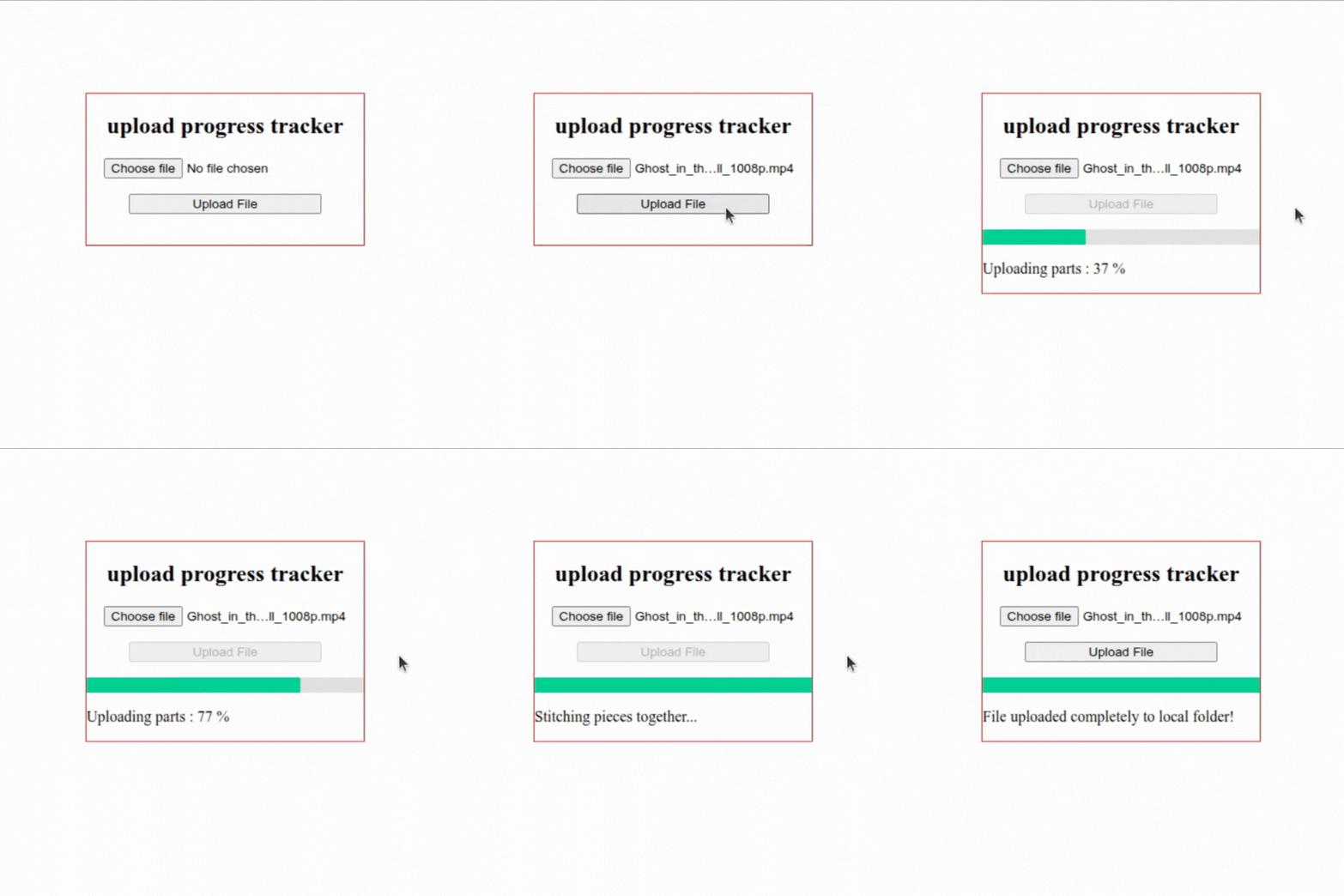
Last night I tried to build a “Local Large File Upload Tracker”. Why local? My answer is my free will. I just wanted to see if I can push a 1–2 GB file without the browser giving up on me.
Normal upload sends the whole file in one request. If it fails at 98% you start from zero and you get no real progress. That annoyed me, so I cut the file into pieces. The full code lives in larger_file_upload on GitHub.
Why One Big Request Doesn't Work
A single POST with a 2 GB body gives you two problems: no useful progress, and no resume. One dropped connection and you re-send everything. Chunking fixes both, because each piece is small, retryable, and countable.
Frontend: One HTML File, 5MB Slices
Frontend is one HTML file. I set chunk size to 5MB and used file.slice in a loop:
const CHUNK_SIZE = 5 * 1024 * 1024;
const totalChunks = Math.ceil(file.size / CHUNK_SIZE);
const chunk = file.slice(start, end);
For each piece I make a FormData with uploadId, chunkIndex, chunk and POST it to /api/upload/chunk. Progress is dumb math:
const progress = Math.round(((i + 1) / totalChunks) * 100);Backend: Init, Chunk, Complete
Backend is Express with multer, cors, fs-extra. It has three routes: init, chunk, complete. That was the smallest thing that worked.
Init makes an uploadId from filename + filesize with base64:
const uploadId = Buffer.from(`${filename} - ${fileSize}`).toString('base64').replace(/=/g, '');If that id already lives in my uploadDatabase object I return nextChunkIndex so frontend skips what it already sent. That's my resume logic, just an array called uploadedChunks that I keep sorting.
Storing Chunks by Index
Chunk route saves each part as chunks/<uploadId>/0, 1, 2 and so on with multer diskStorage. My storage functions look like this:
destination: (req, file, cb) => {
  const chunkFolder = path.join(CHUNKS_DIR, req.body.uploadId);
  fs.ensureDirSync(chunkFolder);
  cb(null, chunkFolder);
},
filename: (req, file, cb) => {
  cb(null, String(req.body.chunkIndex));
}
I use chunkIndex as filename so stitching is just a 0-to-N loop, no sorting of files on disk. On each hit I push the index into uploadedChunks only if it is not already there, then sort that array. That check matters because if frontend retries, I don't want double counting. My session record is plain:
uploadDatabase[uploadId] = { filename, fileSize, totalChunks, uploadedChunks: [] };No DB, just an object that dies if Node restarts. That's why resume only works in the same run.
Stitching Without Corrupting Big Files
Complete route first loops 0 to totalChunks - 1 and calls fs.pathExists for each piece. If one is gone it returns Missing chunk i and stops, it doesn't try to guess. Then it opens one writeStream to uploads/<filename> and appends each chunk buffer in order:
const chunkBuffer = await fs.readFile(chunkPath);
if (!writeStream.write(chunkBuffer)) {
  await new Promise((r) => writeStream.once('drain', r));
}
That drain wait took me a while to get. Without it big files came out corrupt because I was stuffing buffers faster than disk could take. I also log every 10th chunk while stitching because otherwise the terminal sits quiet and I can't tell if it hung. After finish it does fs.remove on the chunk folder and deletes the session.
One weak spot: totalChunks comes from the client in init, server just trusts it. A mismatched count would break the stitch loop.
Retries and Timeouts on the Frontend
Frontend also retries each chunk 5 times with longer waits each time and aborts if one chunk hangs more than 30 seconds with AbortController:
const ctrl = new AbortController();
const t = setTimeout(() => ctrl.abort(), 30000);
const r = await fetch(`${BACKEND_URL}/api/upload/chunk`, {
  method: 'POST', body: formData, signal: ctrl.signal
});
Each retry builds a fresh FormData with uploadId, chunkIndex, chunk. A single failed piece should not kill a full run. It's the same lesson I hit in Building With the Gemini API: read the real error, don't trust the generic status, and treat a failed piece as retryable instead of fatal.
Uploads go one by one in order, no parallel sends yet; that keeps progress math and resume simple but slower than it could be.
To Run It
cd backend
node server.js
Open frontend/index.html, pick a file, click Upload File. Files land in backend/uploads. When testing I kept running rm -rf backend/chunks/* backend/uploads/* to clean up, I even left that in note.txt.
It works. It shows percent, it resumes, it stitches.
What It Doesn't Have Yet
What it doesn't have yet is pause button, speed display, real DB instead of an object that dies on restart. Similar to how my Online Python Code Editor streams output back while keeping the server simple, the next step here would be parallel chunk uploads with honest progress.
I built this because I like to mess around. That's it. Thanks for reading until this now — if you have something to say, you can say to me at kamblevikram2810@gmail.com.